
lynxjs.org
Independent Directory - Important Information
This llms.txt file was publicly accessible and retrieved from lynxjs.org. LLMS Central does not claim ownership of this content and hosts it for informational purposes only to help AI systems discover and respect website policies.
This listing is not an endorsement by lynxjs.org and they have not sponsored this page. We are an independent directory service with no affiliation to the listed domain.
Copyright & Terms: Users should respect the original terms of service of lynxjs.org. If you believe there is a copyright or terms of service violation, please contact us at support@llmscentral.com for prompt removal. Domain owners can also claim their listing.
Current llms.txt Content
# Read This Before Building with Lynx
> This guide targets developers who are already familiar with the web front-end stack. It explains Lynx's core principles, how it differs from the web, and how to build cross-platform applications with Lynx.
---
> \[!IMPORTANT] > **Critical information:**
>
> Reference links are provided after certain statements, pointing to the corresponding sections of the official Lynx documentation. Please read them **proactively** for a complete understanding.
---
## 1. Positioning and Capability Boundaries
* **What**: Lynx is a cross-platform rendering engine that treats the web as its semantic baseline. It targets iOS, Android, HarmonyOS, and the web with a single codebase. A unified element abstraction maps to native views or custom web elements on different hosts, avoiding the performance bottlenecks of traditional WebViews. (See [Composing Elements](https://lynxjs.org/guide/ui/elements-components.md))
* **Why**: Mobile users are extremely sensitive to first-screen time and interaction latency. Lynx combines a dual-thread JavaScript runtime, Instant First-Frame Rendering (IFR), and a native rendering pipeline to deliver the React developer experience alongside near-native performance. (See [Instant First-Frame Rendering](https://lynxjs.org/guide/interaction/ifr.md))
* **How**: On the tooling side, use Rspeedy (an Rspack-powered build tool) to generate a Lynx bundle. On the front end, ReactLynx (a React implementation with a Preact core) describes the UI and communicates with the host through Native Modules or Custom Elements. (See [ReactLynx](https://lynxjs.org/react/introduction.md), [Native Modules](https://lynxjs.org/guide/use-native-modules.md))
## 2. Mental Model: Align Lynx with the Web
| Web Mental Model | Lynx Counterpart | Key Differences |
| ---------------------------- | ------------------------------------------------------------------------------- | ----------------------------------------------------------------------------------------------------------------------------------------------------------------------------------------------------------------------------- |
| `index.html` + assets | Lynx bundle (binary that contains JS bytecode + styles) or a `template.js` file | Bundles must be compatible with the Lynx engine version; configure `engineVersion` (previously `targetSdkVersion`). (See [Compatibility](https://lynxjs.org/guide/compatibility.md)) |
| DOM + CSSOM | Element tree + styling system | Every element behaves like a block-level node. Custom tags such as `view`/`text` map to native controls. (See [Composing Elements](https://lynxjs.org/guide/ui/elements-components.md)) |
| Browser main thread | Lynx main thread | Handles first-screen rendering, layout, and main-thread scripts, executing PrimJS bytecode. (See [Main Thread Runtime](https://lynxjs.org/guide/scripting-runtime/main-thread-runtime.md)) |
| Browser rendering-task queue | Lynx background thread | Runs ReactLynx scheduling, lifecycle, and most side effects. Executes PrimJS/JavaScriptCore with syntax support up to ES2015 (SWC transpiles during build). (See [JavaScript Runtime](https://lynxjs.org/guide/scripting-runtime/index.md)) |
| `window` / `document` | `lynx` global object + API set | No DOM APIs. Access nodes via `lynx.getElementById`, SelectorQuery, `main-thread:ref`, etc. (See [ReactLynx](https://lynxjs.org/react/introduction.md), [Direct Manipulation](https://lynxjs.org/guide/interaction/event-handling/manipulating-element.react.md)) |
## 3. Runtime Architecture: How Dual-Thread React Works
* **Dual-thread parallel rendering**: The main thread renders ReactLynx output immediately for the first screen, while the background thread constructs the full node tree and syncs state back to the main thread to avoid a white screen. (See [Rendering Process and Lifecycle](https://lynxjs.org/react/lifecycle.md), [IFR](https://lynxjs.org/guide/interaction/ifr.md))
* **“Your code runs on two threads”**: Dual-thread React means your logic can run on both threads. However, not all code can execute in both environments—some APIs are only available on the background thread, and ReactLynx only executes events, lifecycle hooks, and `useEffect`-style side effects from the background thread.
* **`'background only'`**: Any function **except a function component** that does not need to run on the main thread (for example event handlers, lifecycle hooks, side effects) or that touches background-only APIs must add `'background only'` as the first statement. Modules can declare `import "background-only"` to indicate they expect to run exclusively on the background thread.
* **Main Thread Script (MTS)**: Functions marked with the `'main thread';` directive run directly on the main thread, ideal for high-frequency gestures, animations, and zero-delay feedback. Main-thread events must use the `main-thread:` prefix (for example `main-thread:bindtap`, `useMainThreadRef`). (See [Main Thread Script](https://lynxjs.org/react/main-thread-script.md))
* **Cross-thread communication**: Use `runOnMainThread` and `runOnBackground` for asynchronous cross-thread calls. Arguments must be JSON-serializable.
## 4. UI Construction: Element System and Native Mapping
* **Element tags**: Built-in tags such as `view`, `text`, `image`, `scroll-view`, etc. abstract native controls. They are not DOM nodes, but the syntax (start/end tag, attributes) stays HTML-like. (See [Composing Elements](https://lynxjs.org/guide/ui/elements-components.md))
* **Cross-platform mapping**: The same element automatically maps to the platform’s native view (`view` → iOS `UIView`, Android `ViewGroup`; on the web it becomes a custom element), so you do not need platform-specific code.
* **Text semantics**: Text must live inside the `text` element. You cannot drop plain text inside a `div` equivalent. Inline layout relies on nested `text` elements. (See [Typography](https://lynxjs.org/guide/styling/text-and-typography.md))
* **Extensibility**: When the built-in set is not enough, register custom native elements. Implement them per platform (iOS/Android/Harmony) and use them through a unified tag. (See [Custom Element](https://lynxjs.org/guide/custom-native-component.md))
Additionally:
* The `svg` element differs significantly from its web counterpart. Pass the SVG markup through the `content` attribute or SVG url through the `src` attribute on `<svg />`:
```jsx
<svg content={`<svg ... />`} />;
// or
<svg src={urlOfYourSvgFile} />;
```
## 5. Layout System: Block by Default with Four Layout Modes
| Layout mode | Web counterpart | Lynx-specific notes |
| ------------------- | -------------------------------------------------- | --------------------------------------------------------------------------------------------------------------------------------------------------------------------------------------------- |
| `display: linear` | No direct counterpart; simplified flex-like layout | The main axis is vertical by default. Use `linear-direction` and `linear-weight` to distribute space—suited for linear arrangements. (See [Linear Layout](https://lynxjs.org/guide/ui/layout/linear-layout.md)) |
| `display: flex` | CSS Flexbox | Most properties match CSS, but `min-content` is unsupported and the shrink lower bound is treated as `0px`. (See [Flexible Box Layout](https://lynxjs.org/guide/ui/layout/flexible-box-layout.md)) |
| `display: grid` | CSS Grid | Supports common row/column definitions and gaps; currently lacks `grid-area` and line names. (See [Grid Layout](https://lynxjs.org/guide/ui/layout/grid-layout.md)) |
| `display: relative` | Android RelativeLayout mental model | Effective on mobile only. Use `relative-*` properties to describe positioning relative to siblings/parent. (See [Relative Layout](https://lynxjs.org/guide/ui/layout/relative-layout.md)) |
Additionally:
* Every element defaults to `box-sizing: border-box`; margin collapsing does not occur. (See [Understanding Layout](https://lynxjs.org/guide/ui/layout/index.md))
* There is no `inline` vs. `block` toggle; text layout relies on the `text` element. (See [Typography](https://lynxjs.org/guide/styling/text-and-typography.md))
* Logical directions (such as `inline-start`) depend on `direction` and require CSS inheritance to be enabled.
* `overflow: scroll` is unsupported. Use `<scroll-view />` and enable scrolling with either the `scroll-y` or `scroll-x` attribute.
* `position` supports `relative`, `absolute`, and `fixed`. Nodes with `fixed` are promoted directly under the root node.
## 6. Styling System: CSS Syntax with Lynx Configuration
* **Special units**: Supports the `rpx` unit to adapt to different screen sizes.
* **Selectors and inline styles**: Largely identical to the web. Combine with PostCSS/Sass nesting if needed. (See [Styling with CSS](https://lynxjs.org/guide/ui/styling.md))
* **Extended properties**: `-x-` prefixed properties expose mobile capabilities such as `-x-auto-font-size`. (See [Styling with CSS](https://lynxjs.org/guide/ui/styling.md))
* **Theming and inheritance**: CSS variables and class switching are supported. Regular properties do not inherit by default—enable `enableCSSInheritance` in `pluginReactLynx` or configure `customCSSInheritanceList`. (See [Custom properties (`--*`): CSS variables](https://lynxjs.org/api/css/properties/css-variable.md), [Theming](https://lynxjs.org/guide/styling/custom-theming.md))
* **Fonts**: Supports `@font-face` and `lynx.addFont`, but the host must implement font loading.
## 7. ReactLynx: Familiar APIs with Lynx Constraints
* **API parity**: Almost identical to React; `import { useState } from '@lynx-js/react'`. The runtime is powered by Preact. (See [What is ReactLynx](https://lynxjs.org/react/introduction.md))
* **Lifecycle**: All lifecycle hooks run asynchronously on the background thread. `useLayoutEffect` is disabled; use `main-thread:bindlayoutchange` to obtain layout information and update properties instead. (See [Rendering Process and Lifecycle](https://lynxjs.org/react/lifecycle.md))
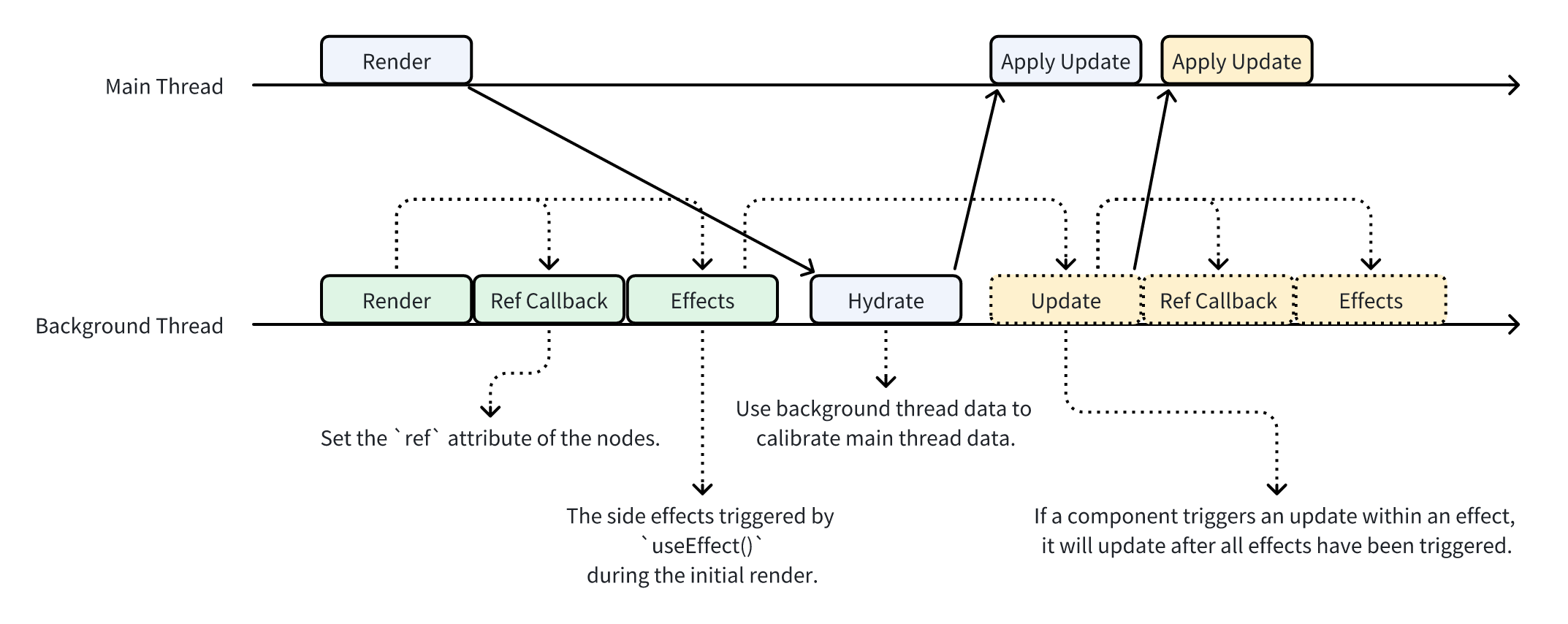
* **Background-only restrictions**: The framework can statically infer some direct cases, but once indirection is introduced—passing event handlers through components or writing custom hooks—you must explicitly add the `'background only'` directive. (See [Thinking in ReactLynx](https://lynxjs.org/react/thinking-in-reactlynx.md))
* **Main-thread functions**: Add `'main thread';` at the top of the function body. Such functions can only run on the main thread (for example in event handlers or `main-thread:ref`). Captured outer variables are snapshotted and must be JSON-serializable, so you cannot capture functions directly.
* **Cross-thread execution**: You cannot call a function defined on the other thread directly. Use `runOnMainThread` / `runOnBackground`, which return Promises for cross-thread calls.
* **Module system**: ESM and CommonJS are both supported and can be mixed, though ESM is recommended. Rspeedy/SWC handles module transformation during the build. (See [JavaScript Runtime](https://lynxjs.org/guide/scripting-runtime/index.md))
## 8. Type System
* **TypeScript support**: Official typings live in `@lynx-js/types`; using TypeScript throughout is highly encouraged. (See [TypeScript Support](https://lynxjs.org/rspeedy/typescript))
* **`tsconfig.json`**: Set `compilerOptions.jsx` to `react-jsx` and `compilerOptions.jsxImportSource` to `@lynx-js/react`.
* **Import types correctly**: All Lynx API types are exported from `@lynx-js/types`, for example `import type { MainThread, NodesRef } from '@lynx-js/types'`. ReactLynx APIs and types come from `@lynx-js/react`.
## 9. Event Model: Naming and Propagation
* **Event attribute names**: `bindtap`, `catchtap`, `capture-bindtap`, `global-bindtap`, etc. denote phase/interception. Main-thread events require the `main-thread:` prefix. (See [Event Propagation](https://lynxjs.org/guide/interaction/event-handling/event-propagation.md))
* **Propagation phases**: Capture plus bubble over the element tree path. Non-touch events fire only on the target node.
* **Event object differences**: The background thread receives plain JSON. Main-thread events expose `MainThread.Element` through `currentTarget`, allowing direct node operations (such as `setStyleProperty`). (See [Event Handling](https://lynxjs.org/guide/interaction/event-handling.md))
* **Global events**: `GlobalEventEmitter` supports cross-component and host broadcasts and must be used on the background thread. (See [Event Propagation](https://lynxjs.org/guide/interaction/event-handling/event-propagation.md))
* **AOP interception**: `lynx.beforePublishEvent` lets you intercept events centrally on the background thread.
## 10. Node References and Direct Manipulation
* **Background thread**: Use `useRef<NodesRef>` with `ref={...}` and operate via `invoke()` / `setNativeProps()`. Remember to call `.exec()` at the end to submit batched operations. (See [Direct Manipulation](https://lynxjs.org/guide/interaction/event-handling/manipulating-element.react.md))
* **Main thread**: `useMainThreadRef` plus `main-thread:ref` yields `MainThread.Element`, which exposes methods such as `setStyleProperty` and `invoke`.
* **Selector APIs**: On the background thread, `lynx.createSelectorQuery()` produces `NodesRef`. On the main thread, use `lynx.querySelector()` / `lynx.querySelectorAll()` to obtain `MainThread.Element`.
* **Getting the event target**: Background-thread event payloads do not carry node references. On the main thread, `event.currentTarget` is a `MainThread.Element`.
* **Thread model**: Background-thread node operations are asynchronous; main-thread node operations are synchronous.
Case study:
* **Retrieve layout information**: Choose the approach that fits your scenario:
* Via events: Listen to `bindlayoutchange` for layout updates—the event object contains layout data. With Main Thread Script, use the main-thread variant `main-thread:bindlayoutchange`.
* Direct node access: Call `boundingClientRect` on the node. Background thread uses `NodesRef.invoke`; main thread uses `MainThread.Element.invoke`. (See [Direct Manipulation](https://lynxjs.org/guide/interaction/event-handling/manipulating-element.react.md))
Common APIs:
* [Interface `NodesRef`](https://lynxjs.org/api/lynx-api/nodes-ref.md)
* [invoke()](https://lynxjs.org/api/lynx-api/nodes-ref/nodes-ref-invoke.md)
* [setNativeProps()](https://lynxjs.org/api/lynx-api/nodes-ref/nodes-ref-set-native-props.md)
* [Interface `MainThread.Element`](https://lynxjs.org/api/lynx-api/main-thread/main-thread-element.md)
* [animate()](https://lynxjs.org/api/lynx-api/main-thread/lynx-animate-api.md)
* [Interface `SelectorQuery`](https://lynxjs.org/api/lynx-api/selector-query.md)
* [exec()](https://lynxjs.org/api/lynx-api/selector-query/selector-query-exec.md)
* [select()](https://lynxjs.org/api/lynx-api/selector-query/selector-query-select.md)
## 11. Data Input and Host Communication
* **Init data**: The host injects initial data with `LynxView.loadTemplate`. Front-end code accesses it via `useInitData`; updates trigger automatic re-rendering. (See [Using Data from Host Platform](https://lynxjs.org/guide/use-data-from-host-platform.md))
* **Data processors**: Use `lynx.registerDataProcessors` to normalize multi-end data structures with named processors on the front end.
* **Global properties**: Read host configurations (such as dark mode) from `lynx.__globalProps` and pair them with theme switching. Actual properties are host-defined; if the host does not provide them, `lynx.__globalProps` is `null` or an empty object.
* **Guaranteeing IFR**: As long as initial data arrives synchronously and the Lynx bundle loads synchronously, the main thread can render a first frame with no white screen. (See [IFR](https://lynxjs.org/guide/interaction/ifr.md))
## 12. Extending Host Capabilities
* **Native Modules**: Declare TypeScript types, implement them separately on iOS/Android/Harmony, and register them. Front-end code calls `NativeModules.xxx` on the background thread. (See [Native Modules](https://lynxjs.org/guide/use-native-modules.md))
* **Custom elements**: When you need capabilities closer to native controls (for example customized inputs), extend `LynxUI` on the host, implement attributes/events/commands, and use it just like a built-in element. (See [Custom Element](https://lynxjs.org/guide/custom-native-component.md))
* **SelectorQuery invoking native commands**: Call `invoke({ method: 'focus' })` to trigger native methods exposed by custom elements. Consult the element’s documentation for supported commands.
## 13. Networking and Runtime Differences
* **Fetch API**: The interface aligns with the web, but depends on the host-provided HTTP service. Enable streaming responses via `lynxExtension.useStreaming` and read from `response.body`. Review official compatibility notes as needed. (See [Networking](https://lynxjs.org/guide/interaction/networking.md))
* **Encoding helpers**: PrimJS currently lacks `TextEncoder` / `TextDecoder`, so use `TextCodecHelper` for UTF-8 encoding/decoding. (See [Networking](https://lynxjs.org/guide/interaction/networking.md))
* **Global object limitations**: There is no `window` or `document`. Replace browser APIs with `lynx` alternatives (such as `lynx.reload`). (See [ReactLynx](https://lynxjs.org/react/introduction.md))
* **Polyfills and syntax**: PrimJS on the main thread supports up to ES2019; the background thread supports ES2015. The build injects polyfills automatically (primarily for iOS). (See [JavaScript Runtime](https://lynxjs.org/guide/scripting-runtime/index.md))
## 14. Performance Tooling and Tuning
* **Main Thread Script**: Keep animations/gestures responsive while respecting thread isolation and data synchronization. (See [Main Thread Script](https://lynxjs.org/react/main-thread-script.md))
* **NodesRef.invoke**: Batch native operations (for example `autoScroll`) to avoid cross-thread overhead. (See [Direct Manipulation](https://lynxjs.org/guide/interaction/event-handling/manipulating-element.react.md))
* **Lynx DevTool & Trace**: The desktop DevTool offers Elements/Console/Sources/Trace panels to record render pipelines and analyze the ReactLynx render process. (See [Lynx DevTool](https://lynxjs.org/guide/devtool.md), [Trace](https://lynxjs.org/guide/devtool/trace.md))
* **Performance metrics**: Use `lynx.performance` and `PerformanceObserver` to capture metrics such as FCP and InitContainer. (See [Performance API](https://lynxjs.org/guide/performance/monitor-performance/performance-api.md))
## 15. Engineering Practices and Tooling
* **Project initialization**: `pnpm create rspeedy` scaffolds a ReactLynx project with Rspeedy configuration and sample code. (See [Quick Start](https://lynxjs.org/guide/start/quick-start.md))
* **Development and debugging**: `pnpm dev` starts the Rspeedy dev server. The terminal prints a QR code—scan it with the LynxExample app (iOS/Android/Harmony emulator) for hot-update previews. (See [Quick Start](https://lynxjs.org/guide/start/quick-start.md))
* **DevTool debugging**: After connecting a device, use the desktop Lynx DevTool to debug JS, inspect nodes, and record performance. (See [Lynx DevTool](https://lynxjs.org/guide/devtool.md))
* **Build artifacts**: Rspeedy outputs a bundle that includes the background-thread script (text), main-thread bytecode, styles, and other assets. Set `DEBUG=rspeedy` to dump intermediate artifacts (background script, main-thread bytecode, styles, source maps, etc.) into `dist/.rspeedy`; otherwise only the final bundle is produced. (See [Output Files](https://lynxjs.org/rspeedy/output.md))
* **Docs asset references**: In MDX, prefer the `@assets` alias for local assets (for example `import demoImg from '@assets/foo.png?url'`) and pass the imported variable to components such as `<Go img={demoImg} />`. Do not hardcode `/assets/...` paths in MDX props.
## 16. Key Differences from the Web
1. **No DOM**: You cannot call DOM APIs, `document.querySelector`, or browser globals. Use Lynx selectors and reference APIs instead.
2. **Dual-thread model**: Separate logic between background and main threads. Functions that must run only on the background thread need the `'background only'` directive.
3. **Different event naming**: Uses `bind` / `catch` / `capture` prefixes. Main-thread events add `main-thread:` and `global-bind` supports cross-component listeners.
4. **Layout is element-centric**: All elements default to block layout. Customize `display` to switch modes. Text must live inside the `text` element.
5. **Opt-in CSS inheritance**: Most properties do not inherit unless configured. `box-sizing` is always `border-box`.
6. **Limited syntax support**: Main thread supports up to ES2019; background thread up to ES2015. Builds rely on Rspeedy/SWC for transpilation.
7. **No `useLayoutEffect`**: Use layout events or main-thread scripts for synchronous measurement and updates.
8. **Host-provided services**: Networking (Fetch), font loading, and Native Modules depend on host implementations.
9. **Bundle ↔ engine coupling**: You must ship the correct `engineVersion` to match the host runtime.
10. **Different first-screen strategy**: IFR avoids white screens but requires synchronous resources and pre-fetched data.
## 17. Quick Reference Table
| Scenario | Web habit | Recommended Lynx approach |
| --------------------------- | ---------------------------------------------------- | ----------------------------------------------------------------------------------------------------------------------------------------------------- |
| Global state updates | `window.dispatchEvent` | `GlobalEventEmitter.toggle` or the host’s `sendGlobalEvent` |
| Synchronous DOM measurement | `useLayoutEffect` + `boundingClientRect` | Read layout from the `main-thread:bindlayoutchange` event object, or get a main-thread ref and call `MainThread.Element.invoke('boundingClientRect')` |
| Gesture animation | JS main-thread event handlers | Combine `main-thread:bindtouchmove` with `'main thread'` functions to mutate styles directly |
| DOM refs | `useRef<HTMLDivElement>` | Use `useRef<NodesRef>` + `.invoke()` on the background thread; switch to `useMainThreadRef` for high-performance cases |
| SSR | Next.js / custom SSR | IFR (main-thread synchronous rendering) plus host-provided `initData` |
| Dynamic theming | CSS variables + `document.documentElement.classList` | Bind `themeClass` to `lynx.__globalProps.appTheme` and pair it with CSS variables |
| Bundle-size optimization | Analyze JS files in the build | Optimize by thread: inspect `main-thread.js` for main-thread bundle size and `background.js` for background bundle size |
| Scroll containers | `overflow: scroll` on any element | Use `<scroll-view />` with either the `scroll-y` or `scroll-x` attribute enabled |
## 18. Appendix: APIs Available Only on the Background Thread
* `lynx.getJSModule`
* `NativeModules`
* `lynx.createSelectorQuery`
* `lynx.getElementById`
* `lynx.reload`
* `lynx.performance.addTimingListener`, `lynx.performance.removeTimingListener`, `lynx.performance.removeAllTimingListener`
* `fetch`
* `setTimeout`, `clearTimeout`
* `setInterval`, `clearInterval`
* `requestAnimationFrame`, `cancelAnimationFrame`
## 19. Appendix: Learn from Examples
The following official Lynx tutorials cover scenarios from beginner to advanced—work through them hands-on:
* Product gallery — build a two-column product page step by step: [Tutorial Gallery](https://lynxjs.org/learn/gallery.md). You will learn to:
* Build foundational UI with styling and interactions
* Componentize the layout
* Render high-performance long lists with the `<list />` element
* Manipulate nodes directly via `NodesRef.invoke` to implement auto-scrolling
* Customize scrollbars and leverage [Main Thread Script](https://lynxjs.org/react/main-thread-script.md) to optimize scrolling performance
* Product detail — implement a carousel component to practice high-performance interaction code: [Tutorial Product Detail](https://lynxjs.org/learn/product-detail.md). You will learn to:
* Manipulate nodes directly with `NodesRef.setNativeProps` to update styles and attributes
* Use [Main Thread Script](https://lynxjs.org/react/main-thread-script.md) to reduce latency
* Call between main-thread and background-thread functions
* Pass values between main-thread and background-thread scripts
## 20. Appendix: Key Built-in Elements
* [`<view>` element](https://lynxjs.org/api/elements/built-in/view.md)
* [`<text>` element](https://lynxjs.org/api/elements/built-in/text.md)
* [`<image>` element](https://lynxjs.org/api/elements/built-in/image.md)
* [`<scroll-view>` element](https://lynxjs.org/api/elements/built-in/scroll-view.md)
* [`<list>` element](https://lynxjs.org/api/elements/built-in/list.md)
* [`<page>` element](https://lynxjs.org/api/elements/built-in/page.md)
* [`<frame>` element](https://lynxjs.org/api/elements/built-in/frame.md)
* [`<input>` element](https://lynxjs.org/api/elements/built-in/input.md)
* [`<textarea>` element](https://lynxjs.org/api/elements/built-in/textarea.md)
* [`<overlay>` element](https://lynxjs.org/api/elements/built-in/overlay.md)
* [`<refresh>` element](https://lynxjs.org/api/elements/built-in/refresh.md)
* [`<scroll-coordinator>` element](https://lynxjs.org/api/elements/built-in/scroll-coordinator.md)
* [`<svg>` element](https://lynxjs.org/api/elements/built-in/svg.md)
* [`<title-bar-view>` element](https://lynxjs.org/api/elements/built-in/title-bar-view.md)
* [`<viewpager>` element](https://lynxjs.org/api/elements/built-in/viewpager.md)
---
With these concepts in place, you can transfer your web experience to Lynx while understanding its unique constraints and strengths. Follow the dual-thread programming model, lean on main-thread scripts, and utilize the host data channels to build cross-platform experiences that balance quality and engineering velocity.
---
## 98. Appendix: Links
You may find more information about Lynx and related resources in the links below:
### Guide
* [Composing Elements](https://lynxjs.org/guide/ui/elements-components.md): A Lynx page may contain various visual elements such as text and images, presented in different layouts to create diverse page styles. This section aims to…
* [Styling with CSS](https://lynxjs.org/guide/ui/styling.md): Cascading Style Sheets (CSS) are used to style and layout Lynx pages. For example, you can change the font, color,…
* [Understanding Layout](https://lynxjs.org/guide/ui/layout/index.md): Lynx provides: Properties such as width, height, margin, and padding are used to describe the size of elements.The display property, along…
* [Linear Layout](https://lynxjs.org/guide/ui/layout/linear-layout.md): If you want to arrange children sequentially without dealing with the complexities of flexible box and grid layouts (such as shrink and placement issues), consider using…
* [Flexible Box Layout](https://lynxjs.org/guide/ui/layout/flexible-box-layout.md): If you need to make the size of child elements adapt to the space of the parent element (such as expanding child elements to fill the unused space…
* [Grid Layout](https://lynxjs.org/guide/ui/layout/grid-layout.md): If you want a responsive layout where multiple elements are staggered both vertically and horizontally, the grid layout is your best choice. This layout is based…
* [Relative Layout](https://lynxjs.org/guide/ui/layout/relative-layout.md): If you want a layout that allows easily control the relative position between the parent and children or between the sibling elements without using complex hierarchical structure, relative…
* [Managing Scrolling](https://lynxjs.org/guide/ui/scrolling.md): Managing scrolling and overflow content using scroll-view and list elements in Lynx.
* [Event Handling](https://lynxjs.org/guide/interaction/event-handling.md): Lynx provides an event mechanism similar to the Web, allowing developers to design and implement custom interaction logic based on events. However, unlike the…
* [Event Propagation](https://lynxjs.org/guide/interaction/event-handling/event-propagation.md): When an event is triggered, it will propagate along the event response chain. If the corresponding type of event handler property is set on the node,…
* [Direct Manipulation of Elements](https://lynxjs.org/guide/interaction/event-handling/manipulating-element.react.md): In daily development, modern front-end frameworks handle most element tree and node property updates for us. However, there are times when you need to manipulate…
* [Visibility detection](https://lynxjs.org/guide/interaction/visibility-detection.md): Detecting node visibility using exposure and intersection observer in Lynx.
* [Exposure Ability](https://lynxjs.org/guide/interaction/visibility-detection/exposure-ability.md): Observing node visibility changes with the exposure capability in Lynx.
* [Intersection Observer](https://lynxjs.org/guide/interaction/visibility-detection/intersection-observer.md): Using IntersectionObserver API to detect node intersection status in Lynx.
* [Networking](https://lynxjs.org/guide/interaction/networking.md): Many mobile apps need to load resources from remote URLs. You might want to make a POST request to a REST API or fetch a large amount of…
* [Instant First-Frame Rendering (IFR)](https://lynxjs.org/guide/interaction/ifr.md): Lynx supports "Instant First-Frame Rendering", which means that your page can display content directly when it is loaded, without a white screen…
* [Visual Appearance](https://lynxjs.org/guide/styling/appearance.md)
* [Motion](https://lynxjs.org/guide/styling/animation.md): Creating transitions, keyframe animations, and gesture-driven motion in Lynx.
* [Theming](https://lynxjs.org/guide/styling/custom-theming.md): Lynx supports a wide range of CSS properties, enabling seamless integration with CSS selectors, CSS variables, and opt-in CSS inheritance. By defining…
* [Typography](https://lynxjs.org/guide/styling/text-and-typography.md)
* [Accessibility](https://lynxjs.org/guide/inclusion/accessibility.md): Building accessible Lynx apps with cross-platform accessibility interfaces.
* [Foldables](https://lynxjs.org/guide/inclusion/foldable-devices.md): Sync dimensions through GlobalProps and screen metrics for low-effort foldable layouts.
* [Internationalization](https://lynxjs.org/guide/inclusion/internationalization.md): Implementing internationalization (i18n) in Lynx apps using i18next.
* [Compatibility](https://lynxjs.org/guide/compatibility.md): This article explains how to ensure version compatibility between Bundle and Lynx Engine, and how to handle challenges that come with Lynx Engine version evolution.
* [JavaScript Runtime and WebAssembly](https://lynxjs.org/guide/scripting-runtime/index.md)
* [WebAssembly](https://lynxjs.org/guide/scripting-runtime/webassembly.md): WebAssembly support in Lynx via the PrimJS runtime on Android.
* [Main Thread Runtime](https://lynxjs.org/guide/scripting-runtime/main-thread-runtime.md)
* [Native Modules](https://lynxjs.org/guide/use-native-modules.md): When developing Lynx applications, you may encounter scenarios where you need to interact with native platform APIs not covered by Lynx. Or, you might…
* [Custom Element](https://lynxjs.org/guide/custom-native-component.md): If the built-in elements do not meet your requirements, you can extend Lynx's capabilities by creating custom native elements. This section will guide you…
* [Native Libraries and Autolink](https://lynxjs.org/guide/autolink.md): A Lynx native library is an npm package that ships any combination of Elements, Native Modules, and Services for a host Lynx app to consume…
* [Using Data from Host Platform](https://lynxjs.org/guide/use-data-from-host-platform.md): Lynx allows the client to provide an initial set of data when the page loads, and then update this data at any time afterward. This…
* [Glossary](https://lynxjs.org/guide/glossary.md): Glossary of technical terms used in Lynx development.
* [storage](https://lynxjs.org/guide/interaction/storage.md)
* [Build with an App Framework](https://lynxjs.org/guide/start/build-with-app-framework.md): Build a new mobile or desktop app from scratch on a Lynx-based app framework like Sparkling or Lynxtron.
* [Integrate Lynx development version](https://lynxjs.org/guide/start/integrate-lynx-dev-version.md): Integrating the Lynx development version with Trace and Recorder for debugging.
* [Advanced DevTool Configurations](https://lynxjs.org/guide/start/integrate-lynx-devtool-advanced.md)
* [Integrating Lynx DevTool](https://lynxjs.org/guide/start/integrate-lynx-devtool.md): Integrating Lynx DevTool into your app for debugging Lynx pages.
* [Integrate with Existing Apps](https://lynxjs.org/guide/start/integrate-with-existing-apps.md): Integrate the Lynx engine into your existing native, desktop, or web app. Supports iOS, Android, HarmonyOS, Web, Windows…
* [Try with Explorer](https://lynxjs.org/guide/start/quick-start.md): Try Lynx with the Explorer sandbox app, no native toolchain required.
* [Tutorial: Payment Details](https://lynxjs.org/guide/start/tutorial-payment-details.md): Tutorial: building a payment details page with advanced interactions in Lynx.
* [<scroll-view>](https://lynxjs.org/guide/ui/layout/scroll-view.md)
### Learn
* [Tutorial: Product Gallery](https://lynxjs.org/learn/gallery.md): Tutorial: building a product gallery page in Lynx step by step.
* [Tutorial: Product Detail](https://lynxjs.org/learn/product-detail.md): Tutorial: implementing a high-performance swiper component in Lynx.
* [Communication Between Node.js and Lynx in Lynxtron](https://lynxjs.org/lynxtron/learn/Communication-Between-Node-And-Lynx.md): If you are familiar with Electron, you can first understand Lynxtron communication needs in two categories: Bidirectional message communication between the Node main process…
* [Building a Custom Window](https://lynxjs.org/lynxtron/learn/Custom-Window-Styles.md)
* [Migrating from Electron to Lynxtron](https://lynxjs.org/lynxtron/learn/Migrating-From-Electron.md): If you already have an Electron app, you can think of the migration to Lynxtron as: keep as much of the main process and desktop…
* [Tutorial: Build Your Own Browser](https://lynxjs.org/lynxtron/learn/introduction_to_browser.md): This tutorial walks you through building a simple multi-tab browser step by step. It does not assume any prior knowledge of Lynxtron. The techniques…
* [What is Lynxtron?](https://lynxjs.org/lynxtron/learn/what-is-lynxtron.md): Lynxtron is a framework for building desktop applications with Lynx and Node.js. If you know Electron, you can think of Lynx…
### Blog
* [Lynx 3.9: Autolink, Web-Aligned CSS, and ReactLynx Portal](https://lynxjs.org/blog/lynx-3-9.md): Lynx 3.9 brings Autolink registration, CSS compatibility improvements, ReactLynx Portal and build optimizations, plus Element…
* [Lynx × Rspack 2.0: Faster, Smaller, Closer to the Web](https://lynxjs.org/blog/lynx-rspack-2.md): Rspeedy 0.15 upgrades to Rspack 2.0 and Rsbuild 2.0, delivering up to 39…
* [Generative UI on Lynx with A2UI](https://lynxjs.org/blog/lynx-a2ui.md): Today, we are officially releasing our renderer for A2UI, an open Agent-to-UI protocol, that brings Generative UI to Lynx…
* [Lynx 3.8: WebAssembly on Android, Adaptive Layout, and More](https://lynxjs.org/blog/lynx-3-8.md): Lynx 3.8 starts the monthly release cadence with WebAssembly on Android, adaptive layout and text fitting, HarmonyOS SessionStorage,…
* [Announcing lynx-ui](https://lynxjs.org/blog/lynx-ui.md): Announcing lynx-ui, a set of ready-to-use components that preserve native user experience while delivering the velocity of the web. With LUNA…
* [Lynx 3.7: Desktop Support, SVG, Skills, and ReactLynx Updates](https://lynxjs.org/blog/lynx-3-7.md): Lynx 3.7 is now officially released! This release brings official desktop platform support for macOS and Windows, introduces the new SVG…
* [Lynx Roadmap 2026](https://lynxjs.org/blog/lynx-open-source-roadmap-2026.md): Lynx is moving to a faster release cadence in 2026, investing in AI-ready docs and tooling, improving desktop readiness, strengthening production…
* [Lynx 3.6: Lynx for AI, reactlynx-use, CSS for Design Engineering](https://lynxjs.org/blog/lynx-3-6.md): Lynx 3.6 is now officially released! This release introduces Lynx for AI to enhance AI-native development capabilities, introduces reactlyn…
* [Lynx 3.5: Main Thread Script, React Compiler, HarmonyOS Improvements](https://lynxjs.org/blog/lynx-3-5.md): Lynx 3.5 is now officially released! Following our stable bi-monthly release cadence, Lynx 3.5 brings several…
* [Announcing Lynx for HarmonyOS](https://lynxjs.org/blog/lynx-harmony.md): Today, we are happy to share that Lynx now provides public beta support for HarmonyOS, delivering feature parity in CSS, Elements, and APIs…
* [Lynx 3.4: HarmonyOS Support, Trace and Recorder, Text Input Elements](https://lynxjs.org/blog/lynx-3-4.md): Lynx 3.4 is now officially released! This release features new platform support for HarmonyOS, enables Windows development, launches new developer…
* [What's new in Lynx 3.2](https://lynxjs.org/blog/lynx-3-2.md): Lynx 3.2 delivers updates across its framework, engine, and tools, including the ReactLynx testing tools, `ll…
* [Lynx Roadmap 2025](https://lynxjs.org/blog/lynx-open-source-roadmap-2025.md): Two weeks ago, we launched Lynx as an open-source project and have since gathered valuable insights and feedback from the community. Thank you for engaging…
* [Lynx: Unlock Native for More](https://lynxjs.org/blog/lynx-unlock-native-for-more.md): Today, we're excited to introduce Lynx, a family of technologies empowering developers to use their existing web skills to create truly native UIs for both…
* [Lynx Blog](https://lynxjs.org/blog/index.md)
### Others
* [Native API Desktop Documentation Cleanup Ledger](https://lynxjs.org/api-desktop-spec-cleanup.md): Ledger tracking Native API desktop documentation alignment and cleanup tasks.
* [Documenting APIs](https://lynxjs.org/help/api.md): The Lynx documentation relies on a structured system to ensure API references are accurate and consistent.
* [Writing Blog Posts](https://lynxjs.org/help/blog.md): The Lynx website hosts a blog to share updates, tutorials, and announcements.
* [MDX Components Reference](https://lynxjs.org/help/components.md): This page serves as a reference for the custom components available in the Lynx documentation. You can import these from @lynx.
* [API Status Dashboard Guide](https://lynxjs.org/help/dashboard.md): This guide explains how to use the Lynx API Status Dashboard to explore API compatibility across different platforms.
* [Managing Interactive Examples (<Go>)](https://lynxjs.org/help/example.md): How to create interactive code examples in documentation.
* [Contributor Guide](https://lynxjs.org/help/index.md): Guide for contributing to the Lynx documentation website.
* [Managing Spec](https://lynxjs.org/help/spec.md): The Lynx Living Specification serves as the definitive technical reference for the Lynx engine.
* [Multi-Subsite Architecture](https://lynxjs.org/help/subsite.md): How the Lynx website multi-subsite architecture and routing works.
* [Authoring Guides](https://lynxjs.org/help/writing.md): Standards and best practices for writing documentation guides.
* [Lynx Native Libraries](https://lynxjs.org/lynxtron/Native-Libraries/Lynx-Native-Libraries.md): A Lynx native library is a native library that registers capabilities with the Lynx runtime. It can be linked into an embedder directly, or…
* [Node.js Native Modules](https://lynxjs.org/lynxtron/Native-Libraries/NodeJS-Native-Modules.md): Lynxtron's support for Node.js native modules is aligned with Electron's: both can use npm native modules in the Node.js environment that…
* [Using webview in Lynxtron](https://lynxjs.org/lynxtron/Native-Libraries/Officially-Maintained-Libraries/cef-webview-getting-started.md): <webview> is the Lynx element for embedding Web content. Its attributes, events, and methods are defined by the Lynx element API…
* [index](https://lynxjs.org/lynxtron/index.md)
* [Getting Started with Lynxtron](https://lynxjs.org/lynxtron/introduction.md): Welcome to the Lynxtron documentation! We will create a Lynxtron project and start developing.
* [Best Practices](https://lynxjs.org/react/best-practices.md): This page covers common patterns and pitfalls when developing with ReactLynx, with a focus on Lynx's dual-thread architecture.
* [Code Splitting](https://lynxjs.org/react/code-splitting.md): Split code into lazy-loaded chunks using Rspack in ReactLynx.
* [Compiler-Informed Rendering](https://lynxjs.org/react/compiler-informed-rendering.md): Learn how to write JSX that works well with ReactLynx compiler optimizations, and how the compiler and runtime work together to render it.
* [Data Fetching](https://lynxjs.org/react/data-fetching.md): Fetch data using the Fetch API and TanStack Query in ReactLynx.
* [A2UI](https://lynxjs.org/react/genui/a2ui.md): A2UI (Agent-to-UI), initiated by Google, is a protocol for Agent-generated user interfaces. The protocol requires the Agent to emit…
* [OpenUI](https://lynxjs.org/react/genui/openui.md): Render streaming OpenUI Lang as native ReactLynx interfaces with built-in components, actions, reactive state, tools, and custom libraries.
* [index](https://lynxjs.org/react/index.md)
* [What is ReactLynx?](https://lynxjs.org/react/introduction.md): ReactLynx is the official React framework for Lynx. It allows you to develop Lynx native apps with a React mental model. With…
* [Rendering Process and Lifecycle](https://lynxjs.org/react/lifecycle.md): Due to Lynx's dual-thread architecture, ReactLynx's rendering process and component lifecycle differ from traditional React. This design aims to address…
* [Main Thread Script](https://lynxjs.org/react/main-thread-script.md): The Main Thread Script is a JS script that can be executed on the main thread. The most common use cases for the main thread script are smooth…
* [Tutorial: Payment Details](https://lynxjs.org/react/payment-details.md): Tutorial: build a payment details page with scrolling lists and 3D animations.
* [Performance Profiling](https://lynxjs.org/react/performance/profiling.md): Find framework profiling in the performance analysis guide.
* [React Compiler](https://lynxjs.org/react/react-compiler.md): Use React Compiler to auto-optimize components in ReactLynx.
* [Code Testing](https://lynxjs.org/react/reactlynx-testing-library.md): Test ReactLynx components using a Testing Library-style API.
* [React Router](https://lynxjs.org/react/routing/react-router.md): Set up React Router v6 for single-page routing in ReactLynx.
* [TanStack Router](https://lynxjs.org/react/routing/tanstack-router.md): Use TanStack Router with memory and file-based routing in ReactLynx.
* [Jotai](https://lynxjs.org/react/state-management/jotai.md)
* [Valtio](https://lynxjs.org/react/state-management/valtio.md)
* [Zustand](https://lynxjs.org/react/state-management/zustand.md)
* [Thinking in ReactLynx](https://lynxjs.org/react/thinking-in-reactlynx.md): ReactLynx follows React's programming model, but leverages the dual-threaded runtimes provided by Lynx to achieve better performance and user…
* [Static Assets](https://lynxjs.org/rspeedy/assets.md): Powered by Rsbuild, Rspeedy supports using static assets, including images, fonts, audios and videos.
* [Build Profiling](https://lynxjs.org/rspeedy/build-profiling.md): Performing a performance analysis can help you identify performance bottlenecks in your project, allowing for targeted optimization.
* [CLI](https://lynxjs.org/rspeedy/cli.md): Rspeedy comes with a lightweight CLI that includes commands such as dev and build.
* [External Bundle](https://lynxjs.org/rspeedy/external-bundle.md): Build and load shared Lynx bundles for cross-application reuse.
* [index](https://lynxjs.org/rspeedy/index.md)
* [Map Production Errors to Source](https://lynxjs.org/rspeedy/map-errors-to-source.md): A production Lynx error reaches your monitoring as a minified, bundled stack. For example (large fields shown as ...): Every position points into…
* [Output Files](https://lynxjs.org/rspeedy/output.md): This chapter will introduces the directory structure of output files and how to control the output directory of different types of files.
* [Plugin](https://lynxjs.org/rspeedy/plugin.md): Extend Rspeedy with Rsbuild and Rspack plugins.
* [Module Resolution](https://lynxjs.org/rspeedy/resolve.md): Configure path aliases and module resolution in Rspeedy.
* [Runtime Profiling](https://lynxjs.org/rspeedy/runtime-profiling.md)
* [Styling](https://lynxjs.org/rspeedy/styling.md): Style apps with CSS Modules, preprocessors, PostCSS, and Tailwind CSS.
* [TypeScript](https://lynxjs.org/rspeedy/typescript.md): Powered by Rsbuild, Rspeedy supports TypeScript by default, allowing you to directly use .ts and .tsx files in your projects.
* [Map the UI Tree to Source](https://lynxjs.org/rspeedy/ui-source-map.md): At runtime a Lynx page is a tree of UI nodes: the elements the engine actually rendered. The UI source map lets you take that runtime…
* [Upgrade Rspeedy](https://lynxjs.org/rspeedy/upgrade.md): This section explains how to upgrade the project's Rspeedy-related dependencies.
* [Use Rsdoctor](https://lynxjs.org/rspeedy/use-rsdoctor.md): Analyze and diagnose builds with Rsdoctor in Rspeedy projects.
* [CHANGELOG](https://lynxjs.org/ui/changelog.md)
* [<Button>](https://lynxjs.org/ui/components/button.md): {lynxUiIntros\['lynx-ui-button']}
* [<Checkbox>](https://lynxjs.org/ui/components/checkbox.md): Checkbox component with indeterminate state support.
* [Dialog](https://lynxjs.org/ui/components/dialog.md): {lynxUiIntros\['lynx-ui-dialog']} The dialog component. Have a customizable background mask layer.
* [<Draggable>](https://lynxjs.org/ui/components/draggable.md): {lynxUiIntros\['lynx-ui-draggable']}
* [<FeedList>](https://lynxjs.org/ui/components/feed-list.md): High-performance feed list with pull-to-refresh support.
* [<Form>](https://lynxjs.org/ui/components/form.md): {lynxUiIntros\['lynx-ui-form']}
* [<Input>](https://lynxjs.org/ui/components/input.md): Input component with controlled, uncontrolled, and keyboard avoidance.
* [<LazyComponent>](https://lynxjs.org/ui/components/lazy-component.md): {lynxUiIntros\['lynx-ui-lazy-component']} import { lazyComponentBasicDemoMeta, lazyComponentVisibilityMarginDemoMeta…
* [<List>](https://lynxjs.org/ui/components/list.md): {lynxUiIntros\['lynx-ui-list']}
* [Overlay](https://lynxjs.org/ui/components/overlay.md): Drop-in overlay component replacing the native overlay element.
* [Popover](https://lynxjs.org/ui/components/popover.md): {lynxUiIntros\['lynx-ui-popover']}
* [RadioGroup](https://lynxjs.org/ui/components/radio-group.md): {lynxUiIntros\['lynx-ui-radio-group']} import { radioGroupBasicDemoMeta, radioGroupDisabledDemoMeta, }…
* [<Scrollview>](https://lynxjs.org/ui/components/scroll-view.md): Scroll container with lazy-loading and cross-platform bounces.
* [<Sheet>](https://lynxjs.org/ui/components/sheet.md): Sliding panel component for presenting contextual actions.
* [<Sortable>](https://lynxjs.org/ui/components/sortable.md): {lynxUiIntros\['lynx-ui-sortable']}
* [<SwipeAction>](https://lynxjs.org/ui/components/swipe-action.md): Swipe gesture component for revealing contextual actions like delete.
* [<Swiper>](https://lynxjs.org/ui/components/swiper.md): Swipeable carousel component with loop and lazy loading.
* [<Switch>](https://lynxjs.org/ui/components/switch.md): {lynxUiIntros\['lynx-ui-switch']}
* [Contributing](https://lynxjs.org/ui/contributing.md): Guide to contributing components and code to lynx-ui.
* [faqs](https://lynxjs.org/ui/faqs.md)
* [index](https://lynxjs.org/ui/index.md)
* [What is lynx-ui?](https://lynxjs.org/ui/introduction.md): Introduction to lynx-ui, the official headless UI library for ReactLynx.
* [LUNA Themes and Tokens](https://lynxjs.org/ui/luna-themes-tokens.md): Semantic design token system powering lynx-ui themes.
* [@lynx-js/motion/mini](https://lynxjs.org/ui/motion-mini.md): Use @lynx-js/motion/mini for lightweight main-thread numeric animations in Lynx.
* [@lynx-js/motion](https://lynxjs.org/ui/motion.md): Use @lynx-js/motion for main-thread animations, motion values, staggered effects, and gesture-driven UI in Lynx.
* [Performance Hint](https://lynxjs.org/ui/performance-hint.md)
* [Primitives and Themes](https://lynxjs.org/ui/styling-theming.md): Unstyled primitives and how to style and theme them.
* [troubleshooting](https://lynxjs.org/ui/troubleshooting.md)
* [Lynx versions](https://lynxjs.org/versions.md): Lynx publishes stable releases on a regular cadence. You can find the current release plan in the 2026 roadmap.
## 99. Appendix: Lynx APIs
If you need the full list of all APIs of Lynx, please refer to the [Lynx APIs](https://lynxjs.org/api/llms.txt).
Version History
Categories
Visit Website
Explore the original website and see their AI training policy in action.
Visit lynxjs.orgContent Types
Recent Access
No recent access